See which connectors are free
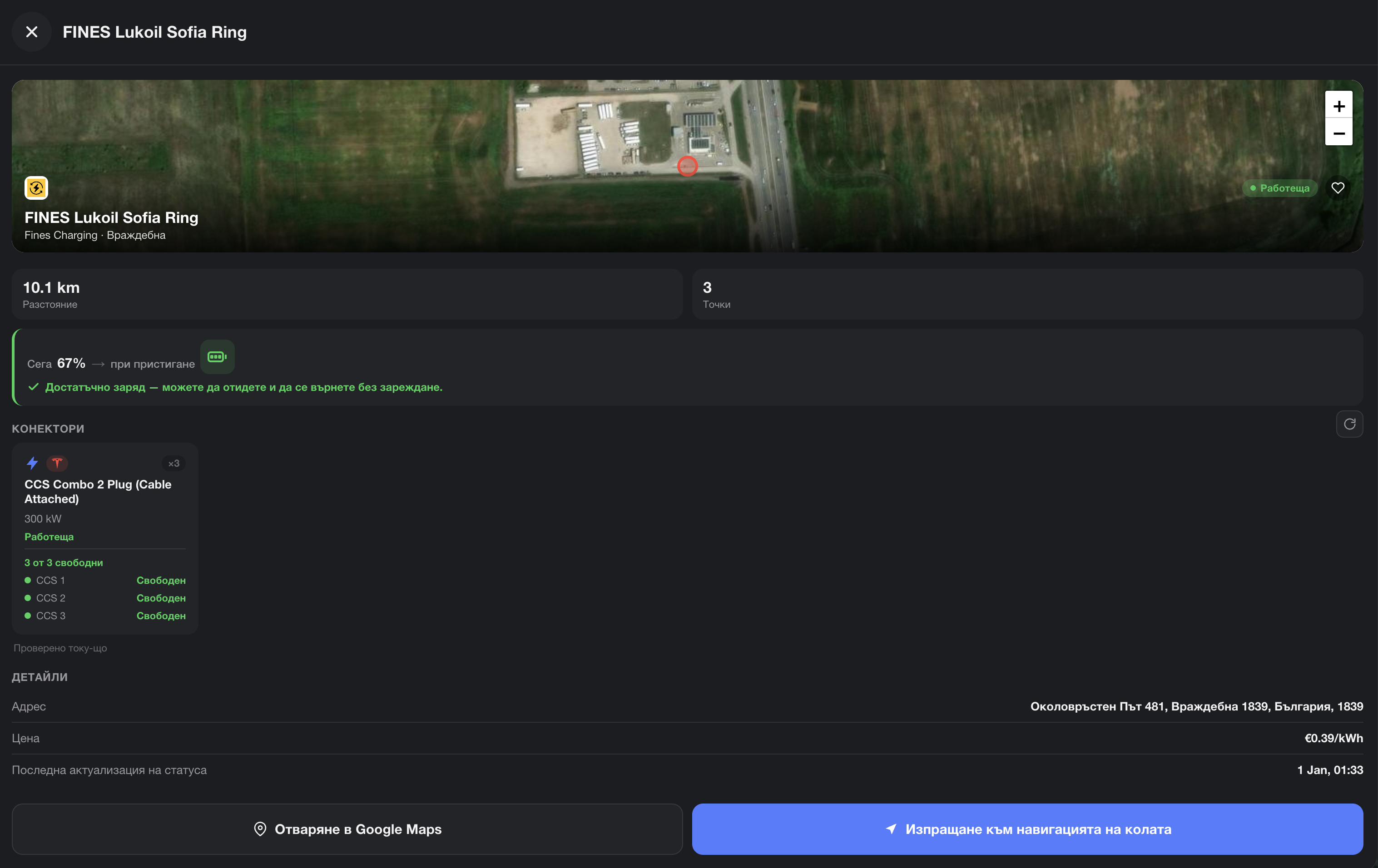
EVStick shows which connectors at a charging station are occupied and which are available right now — before you drive there.
Connector availability is shown for the  Fines Charging network only.
 EVStick
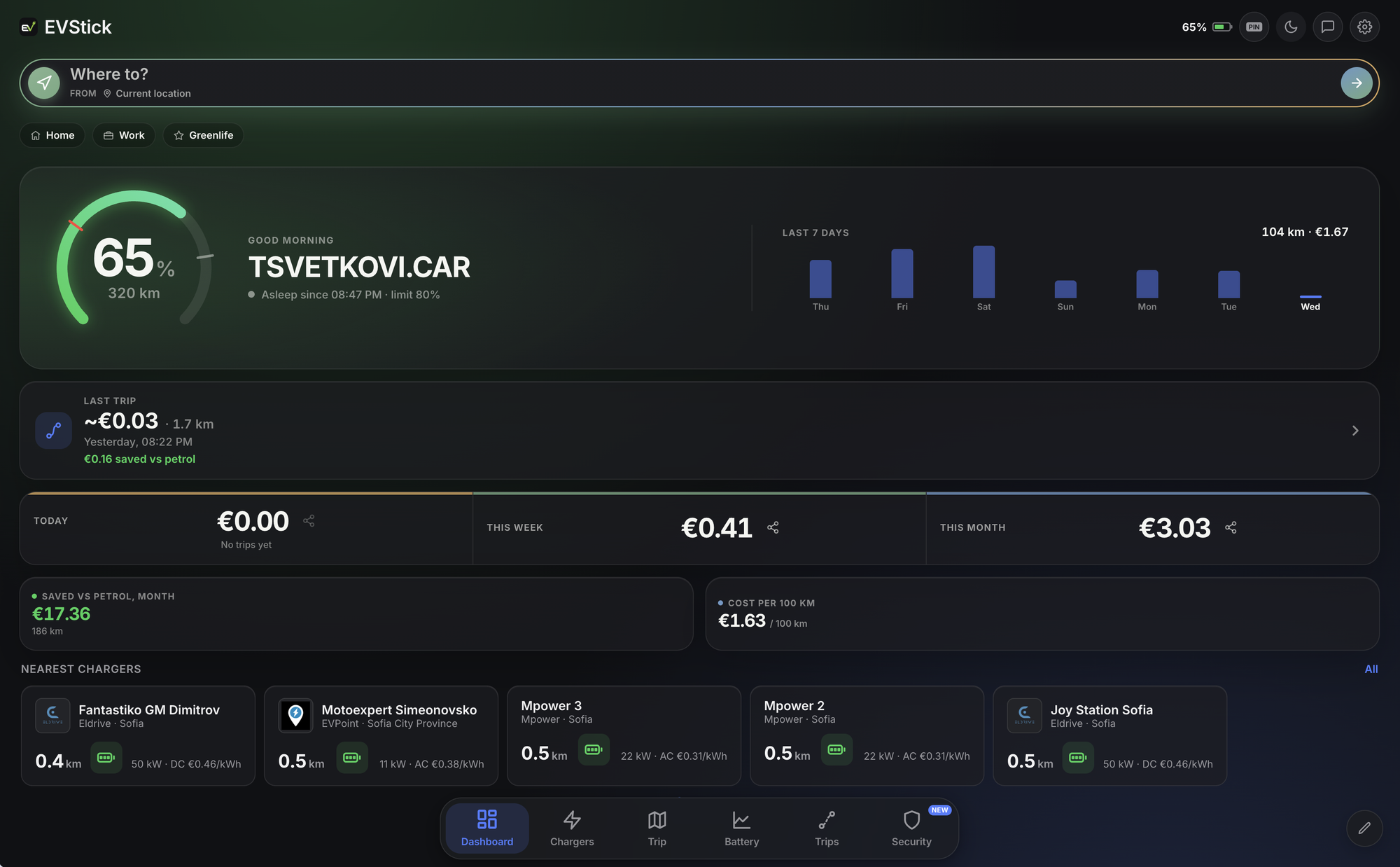
What your day, week, month and every trip cost you — from your real charging sessions. Plus every charging station along your route, sent to the car's navigation with one tap. Free, through the official Tesla API — anywhere in Europe.
EVStick is a free web app for Tesla owners in Europe. It connects to the car through the official Tesla Fleet API and shows you what every day, month and trip costs, where the energy goes while the car is parked, and every charging station along your route — with prices, power and free connectors. Costs are worked out in 39 European countries, in your own currency; the charging-station catalogue covers Bulgaria and Greece. It runs in the phone's browser and on the car's screen, nothing to install.
Other apps show the price of electricity. EVStick shows your price: every charge is booked at the rate it was actually bought at — the station's or your home's — and every trip draws down that stock. So you know what the drive to Varna cost, and what the whole of September did.
Sample data
Driving cost in November
At a public station — the network's published tariff. At home — your region's or country's electricity price, worked out automatically, or the rate from your own bill.
The trip log shows what each trip cost and what you spend per 100 km. The dashboard totals the day, the week and the month, and compares each with the one before.
The battery history shows what drained the charge in the car park — Sentry Mode, climate, Powershare — hour by hour.
EVStick prices your driving in 39 European countries: home charging at your country's electricity price — or the rate on your own bill — totals in your currency, distances in kilometres or miles. Pick a country and see.
Where do you drive?
Home electricity
Day rate for your region, detected automatically · night €0.07
Example at 16 kWh/100 km and 7 l/100 km. Electricity: Eurostat, second half of 2025. Petrol: official pump prices, November 2026. Currency: ECB reference rate.
Home charging is priced at your country's average household rate. On a better deal, or a night rate? Enter it once in Settings, with its hours.
Euro, pounds, francs, kroner, złoty, lei, forints — 12 currencies at the ECB reference rate. Kilometres or miles, °C or °F — set by your country, changeable in Settings.
The catalogue of stations, prices and free connectors covers Bulgaria and Greece. Costs, the trip log, battery history and sharing work with your Tesla anywhere in Europe.
Other apps hand you one stop and that's it. EVStick shows every charging station along your route — with network, power, price and distance — so you can pick the one that suits you. Don't like the suggested stop? Pick another and send it to the car in seconds.
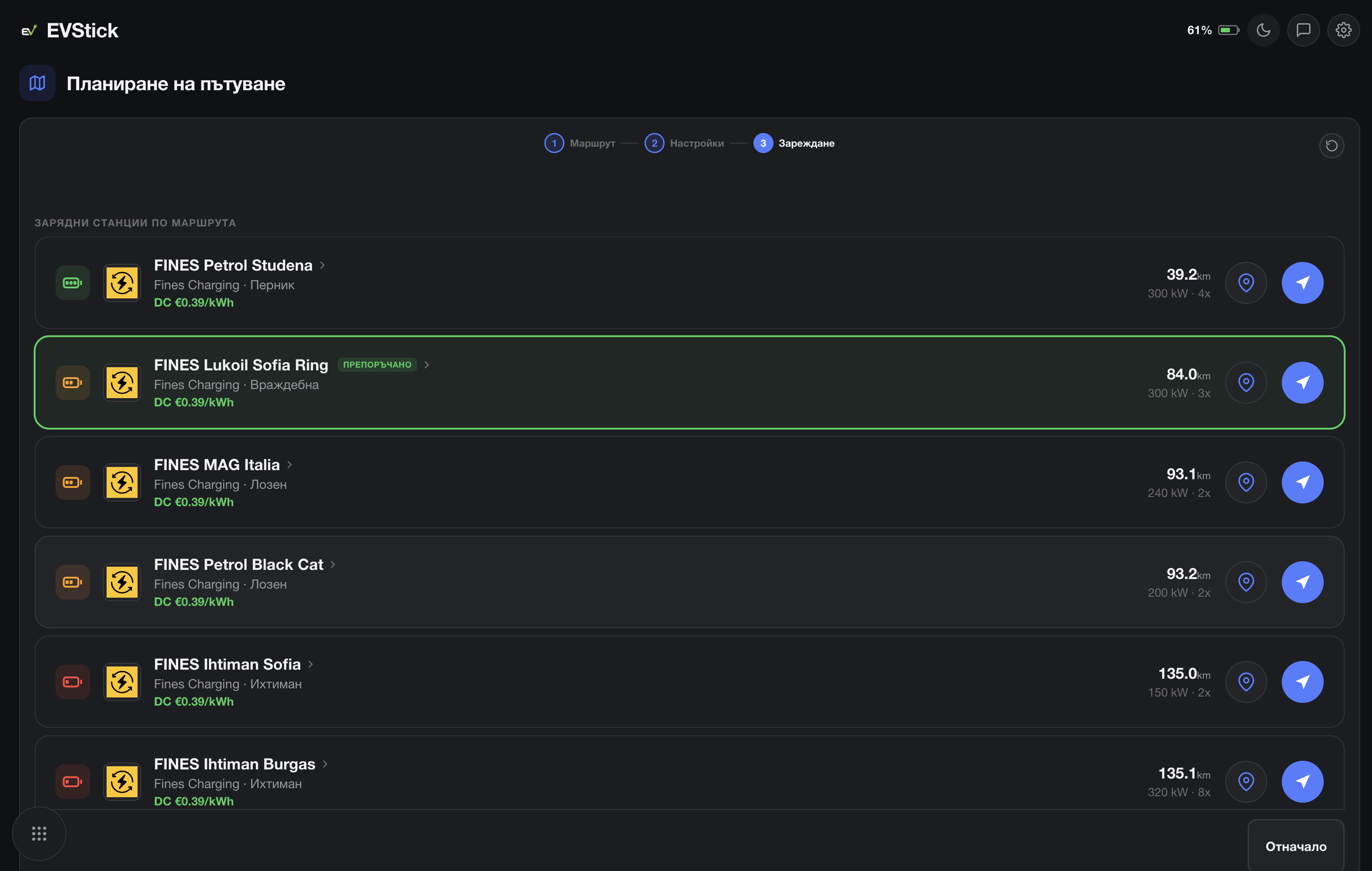 Every station on the route
You choose the stop
Send it to the car
Not a single recommendation, but every charging station on your way — with network, power, price and distance.
Compare location, network, power, price and distance, then choose the stop that works for you.
Don't like it? Pick another station and send it straight to your Tesla's navigation.
Before you even head for the station you know whether a connector is free. And its pin opens the navigation you actually use — Google Maps or Waze.
EVStick shows which connectors at a charging station are occupied and which are available right now — before you drive there.
Connector availability is shown for the Fines Charging network only.
Turn on the drive beat from the button next to the logo and EVStick starts an electronic track that follows the car's real speed: a new instrument with every speed band, tension that keeps building, and a drop as you join the motorway.
Drag the speed — or let the demo do the driving.
Standing still, only a chord plays. Pull away and the kick comes in, then the bass, the clap and the arpeggio — each layer at its own speed, always on the beat.
Around 100 km/h there's one bar of build-up and then the drop — right as you join the motorway. The tempo rises with your speed.
Lift off or brake and the music sinks behind a filter. Get back on the power and it opens up again.
Off by default, and only on the car's screen. Every sound is synthesised live in the browser — nothing to download. Here the speed comes from the slider; in the car, from GPS.
Stories from people already using EVStick for daily driving and longer trips.
Coverage beyond borders
From your daily charge in the city to your next holiday in Greece. Find a station, compare networks and keep going your way.
Stations per network in the catalogue. Real-time free connectors are shown for Fines Charging, Electrip, Wink and — once signed in with Tesla — EVPoint, KIA, EVN and Mpower.












Now in Greece
Plan your drive to the coast with EVStick and find charging stations across Greece — along your route and near your destination.
EVStick is a free web app for Tesla owners in Europe. It shows what every trip costs, what the battery spends while the car is parked, and every charging station along your route — with prices, power and free connectors. Costs are worked out in 39 European countries; the charging-station catalogue covers Bulgaria and Greece. It connects to the car through the official Tesla Fleet API and runs in the browser, including on the car's screen.
EVStick is free. There is no subscription, no paid tier and no card needed. Sign in with your Tesla account and you're set.
EVStick treats the energy in the battery as stock: every charge adds energy at the price it was bought at — the charging network's published tariff or your home rate — and every trip draws down that stock at its average price. So a trip's cost reflects what you actually paid for the electricity, not an average energy price. The figure is an estimate: a station's tariff can depend on a membership plan, and the home rate is your region's or country's average until you enter the one from your bill.
A charge that isn't at a known public station is treated as home charging. In Bulgaria EVStick works out automatically which distribution region it happened in and applies that region's day or night rate for the hour. Everywhere else it uses the country's average household electricity price from Eurostat. If you know the rate on your bill, enter it in Settings — with a night rate and its hours if you have one — and EVStick prices from that instead.
Yes. Trip costs, the trip log, battery history and sharing work in 39 European countries: home charging is priced at your country's electricity price or your own rate, totals are shown in one of 12 currencies, and distances in kilometres or miles. The catalogue of charging stations, their prices and free connectors covers Bulgaria and Greece for now.
Yes. Tap the total for the day, the week or the month on the dashboard — or Share on any trip in the trip log — and EVStick draws an image with the total, the distance and the cost per 100 km, plus a ready caption with the link. A trip card shows the towns only, never the exact address.
In Bulgaria: Fines Charging, Eldrive, Electrip, EVPoint, Wink, Electrocharge, OMV eMotion, KIA, EVN and Mpower, with their published prices. In Greece: over 80 networks (nrg incharge, DEI Blue, Chargespot, Joltie, Blink, EKO Charge&Go and more) from OpenStreetMap data. Real-time free connectors are shown for Fines Charging, Electrip, Wink, EVPoint, KIA, EVN and Mpower. The catalogue is refreshed weekly.
Yes. Access goes entirely through the official Tesla Fleet API: you sign in on Tesla's own site, and EVStick never sees your password and cannot store it. To send destinations to the navigation or start the climate, EVStick asks for a separate virtual key that you approve from the Tesla app and can remove at any time.
Open evstick.com, tap "Sign in with Tesla" and approve access on Tesla's site. Connecting takes about two minutes and is done once. The step-by-step guide explains every screen.
Yes. EVStick is a web app and opens in the Tesla browser with nothing to install — plan the trip from the car's screen and send the stop to the navigation with one tap. On the phone, station pins open Google Maps or Waze, your choice.
A feature for the car's screen only: electronic music that EVStick synthesises live and that follows your speed — a new instrument comes in with every speed band, and around 100 km/h the drop lands. It's off by default; turn it on with the button next to the logo, and the choice is remembered on that device.
Yes. In the route planner, tap From and pick another start point — say, for tomorrow's drive from the holiday house. By default the route starts from your current position.
Connecting takes two minutes and is done once. The first trip after that already has a price — and a picture to share.
Sign in with Tesla →